
TPS7A6201EVM
1 Introduction
The Texas Instruments TPS7A6201QKTT EVM evaluation module (EVM) helps designers evaluate the
operation and performance of the TPS7A6201QKTT Linear Regulator.
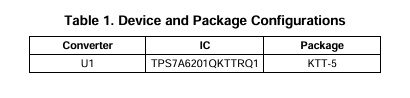
The EVM contains one linear regulator (see Table 1).
2 Setup
This section describes the jumpers and connectors on the EVM as well and how to properly connect, set up and use the TPS7A6201QKTT EVM.
2.1 Input/Output Connector Description
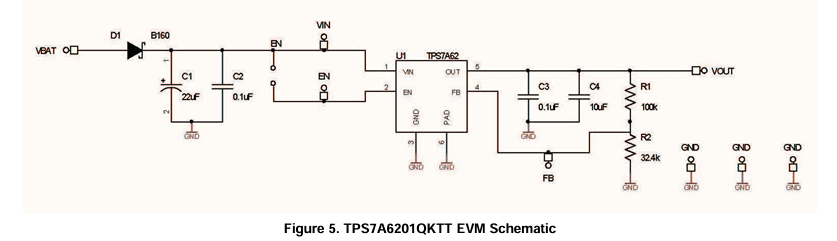
VBAT is the protected power input for the regulator. The test point provides a power (Vbat) connection
and a reverse battery protection diode to allow the user to power the EVM.
GND is the ground return for the regulator. The EVM provides three GND test points to allow the user to power the EVM, connect the load and attach an oscilloscope ground lead VIN is a power test point. The test point allows the user to measure the input voltage after the reverse battery protection diode. The user can also apply power to the regulator through this test point.
VOUT is output for the regulator. The test point provides a connection to attach a load to the EVM.
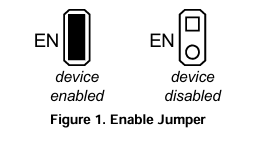
EN is a test point to monitor the Enable input to the device. It can also be used to provide an enable signal to the device from an outside source, if the EN jumper is left open. The EN jumper will disable the regulator when removed and enable the regulator when installed.
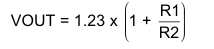
FB is a test point to monitor the feedback voltage to the device. The EVM is setup to provide a 5V output
voltage, but the feedback resistors can be changed to set the output voltage to a value between 2.5V and
7V using the equation presented in Equation
2.2 Setup
The input voltage range for the converter is (VOUT + 0.3V) volts to 40 volts. The EVM can support up to 300mA of load current
2.3 Operation
The TPS7A6201QKTT will power-up after the VBAT voltage has exceeded the Power-On Reset threshold. In this configuration, the device will power up when power is applied.
The PCB offers footprints for the TPS7A6201QKTTQ1 or the TPS7A6201QKVUQ1 device.
3 Board Layout
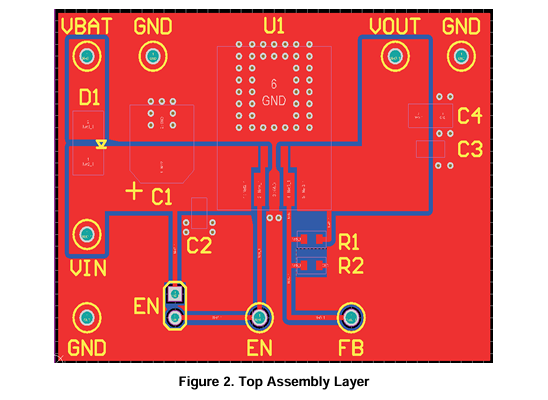
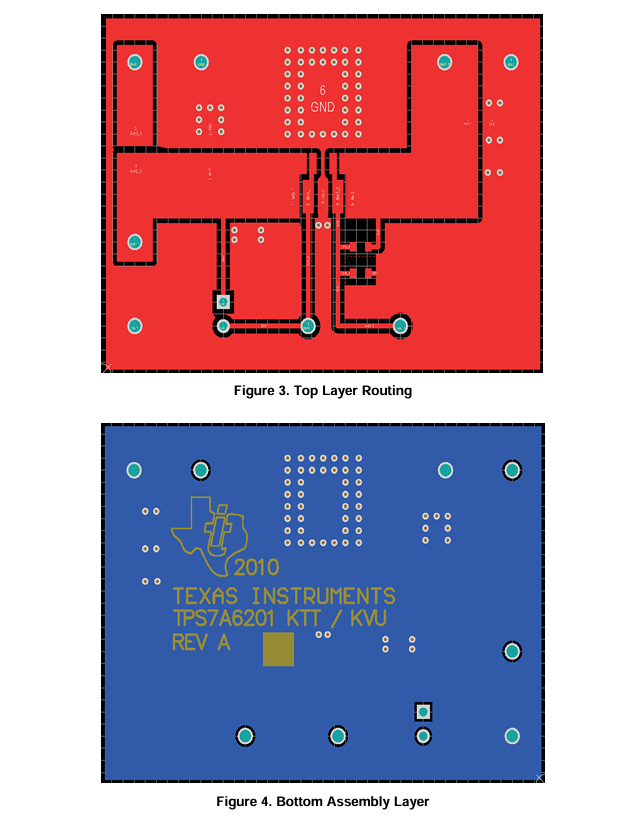
Figure 2, through Figure 4 show the board layout for the TPS7A6201QKTT EVM PWB. The PowerPAD ™package offers an exposed thermal pad to enhance thermal performance. This must be soldered to the copper landing on the PCB for optimal performance. The PCB provides 2 oz copper planes on the top and bottom to dissipate heat.
4 Schematic and Bill of Materials
4.1 Schematic
- LP8557IEVM_TI(德州仪器)中文资料_英文资料_价格_PDF手册
- LAUNCHXL-F28027F TI(德州仪器)中文资料_英文资料_价格_PDF手册
- DLPDLCR160CPEVM DLP160CP TI(德州仪器)中文资料_英文资料_价格_PDF手册
- THS4631DDAEVM TI(德州仪器)中文资料_英文资料_价格_PDF手册
- DAC3482EVM TI(德州仪器)中文资料_英文资料_价格_PDF手册
- THS4302EVM TI(德州仪器)中文资料_英文资料_价格_PDF手册
- ADS7038Q1EVM-PDK_TI(德州仪器)中文资料_英文资料_价格_PDF手册
- LM3450AEV230V30/NOPB_TI(德州仪器)中文资料_英文资料_价格_PDF手册
- TPS72728DSEEVM-406_TI(德州仪器)中文资料_英文资料_价格_PDF手册
- WL1835MODCOM8A_TI(德州仪器)中文资料_英文资料_价格_PDF手册
- TAS5424BQ1DKDEVM_TI(德州仪器)中文资料_英文资料_价格_PDF手册
- ADS7042EVM-PDK_TI(德州仪器)中文资料_英文资料_价格_PDF手册
- TMDS570LS31HDK_TI(德州仪器)中文资料_英文资料_价格_PDF手册
- VCA8500BOARD_TI(德州仪器)中文资料_英文资料_价格_PDF手册
- DEM-SOT223LDO_TI(德州仪器)中文资料_英文资料_价格_PDF手册
 工商网监
工商网监