
TLC6C5716EVM
Thisdocument isaguideforusingtheTLC6C5716-Q1EVMandGUI.TheTLC6C5716EVMisdesigned tobecontrolledwiththeTLC65716EVMGUIviaaUSB2ANYcommunicationtool.TheTLC6C5716EVM canbepoweredbyamicro-USBsupplywithaPCUSBport.TheTLC6C5716EVMGUI isdesignedto demonstratetheTLC6C5716-Q1features.
Trademarks
All trademarksarethepropertyof theirrespectiveowners.
1 Introduction
TheTLC6C5716-Q1deviceisa16-channel,constant-currentLEDdriverdesignedtosupportautomotive LEDapplications.
1.1 Features
TheEVMhasthefollowingfeatures:
• 16constant-current-sinkoutputchannels
• Excellentconstant-currentaccuracy
• 7-bit individualdotcorrection
• 8-bitglobalbrightnesscontrol
• 12-bitPWMdimming
• LEDprotectionanddiagnostics
1.2 Applications
This EVM can be used in the following applications:
• Automotive cluster indicator
• Automotive HVAC panel
• Automotive E-shifter indicator
• Automotive local dimming display
• Automotive ambient lighting
1.3 Description
1.3.1 Kit Contents
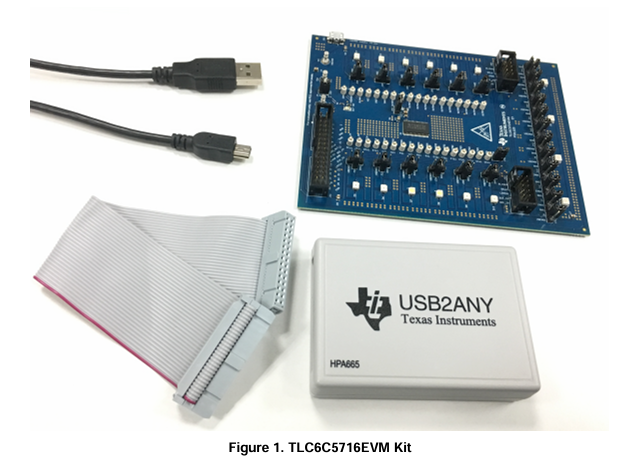
The TLC6C5716EVM kit contains a USB2ANY, TLC6C5716EVM, and two connection cables, as Figure 1 shows.
1.3.2 Additional Items Required
The following additional items are required to run the TLC6C5716EVM:
• PCwith the TLC6C5716EVM GUI installed
• 5-VDCsupply or USB port for LED supply
2 Test Setup and Results
2.1 Hardware Setup
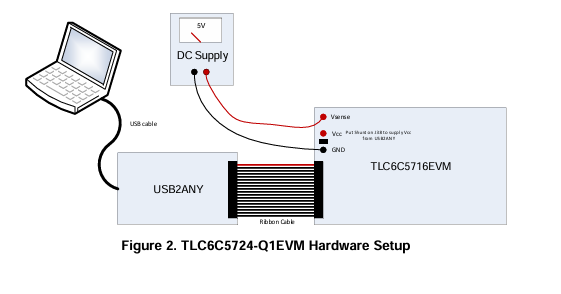
Figure 2 shows the hardware setup of the TLC6C5716-Q1 EVM:
• Connect the 5-V power supply to the LED board between TP1 (SENSE) and TP3 (GND), use the 5-V micro-USB supply connected to J36 to supply the LED.
• Put ashunt on J53 to connect the USB2ANY 3.3-V supply to VCC. In this case, extra DC supply is not needed to supply the VCC.
• Connect the host computer to the USB2ANY board via a USB cable. xx
• Connect the ribbon cable between the USB2ANY board and the TLC6C5716-Q1 EVM board.
2.2 Software Installation
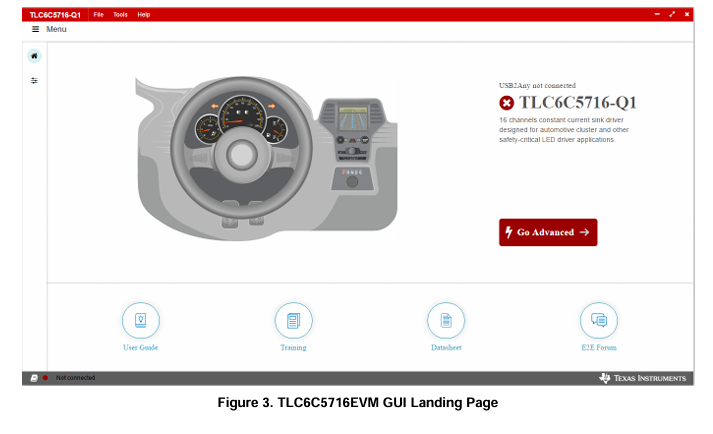
Download the GUI software from the TLC6C5716-Q1 EVM tool folder and install on the PC. Once installed, a shortcut to the GUI is found on the desktop and also in the start-up menu under the Texas Instruments folder. Figure 3 shows the landing page of the TLC6C5716EVM GUI. A support document link is on bottom of the landing page.
2.3 GUI Function
This section provides instructions to run the TLC6C5716EVM using the TLC6C5716EVM GUI.
2.3.1 Connection Status
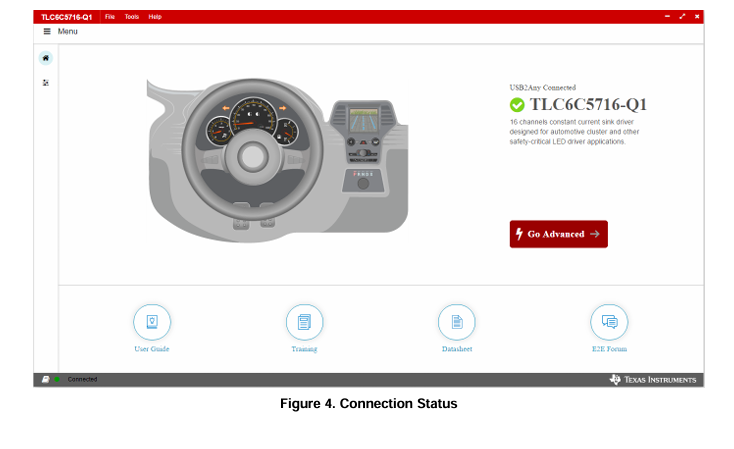
The TLC6C5716EVM connection status appears on the GUI landing page. A red status indicator means Device Not connected, a green status indicator means Device connected. Click the Go Advanced button and a quick configuration page opens for control of the TLC6C5716EVM.
2.3.2 Advanced Settings Page
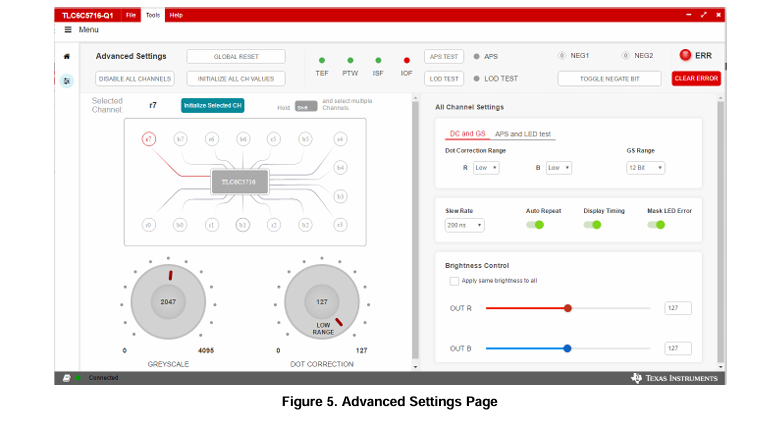
The Advanced Settings page (Figure 5) provides more register configuration features. The GLOBAL RESET button resets the TLC6C5716-Q1 internal registers, meaning all registers values are set to 0, except the Mask LED Error bit is set to 1. The INITIALIZE ALL CH VALUES buttons turns on all channels with 50% grayscale (GS), dot correction, and brightness control values. GS and dot correction channels can be adjusted separately.
For APS TEST and LOD TEST, turn off all output channels first, then perform the test. For other configurations, refer to TLC6C5716-Q1 16-Channel, Full Diagnostics, Constant-Current LED Driver With 7-Bit Dot Correction and 12-Bit PWM Dimming for details.
2.3.3 Device Cascading
Use J34 and J35 to connect two TLC6C5716-Q1 EVMs in cascading mode. Note that users should remove J34 shunt during the cascading mode.
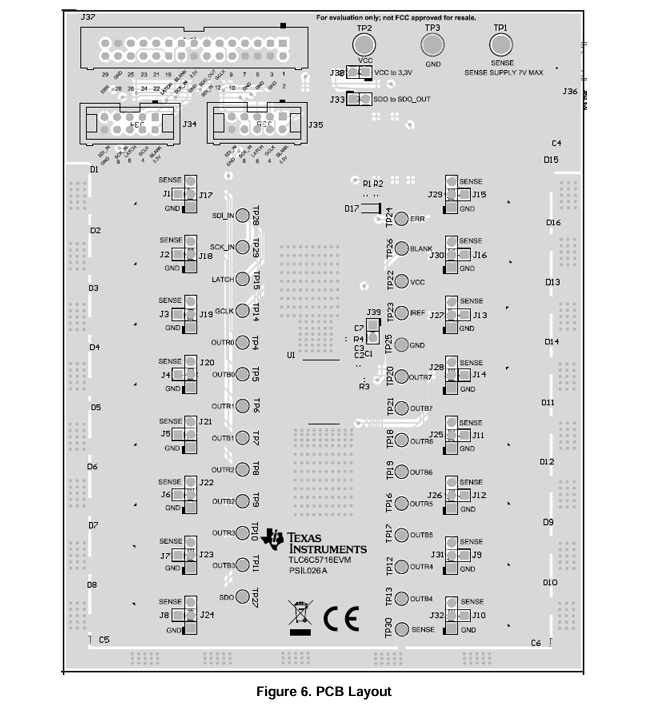
3 Board Layout
Figure 6 illustrates the PCB layout of TLC6C5716EVM.
4 SchematicandBillofMaterials
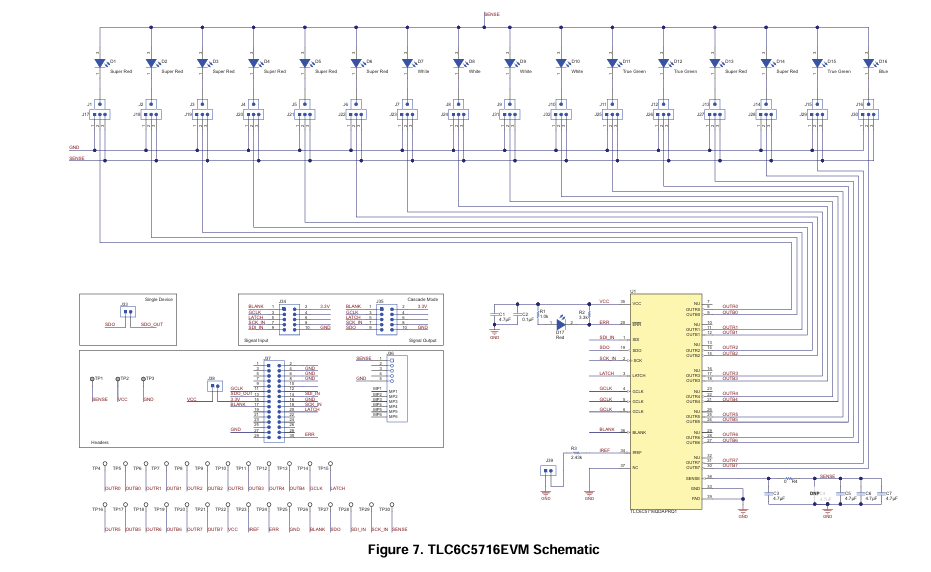
4.1 Schematic
Figure7illustratestheTLC6C5716EVMschematic.
- TLA2024EVM-PDK_TI(德州仪器)中文资料_英文资料_价格_PDF手册
- INA229_239EVM_TI(德州仪器)中文资料_英文资料_价格_PDF手册
- DAC8832EVM-PDK _TI(德州仪器)中文资料_英文资料_价格_PDF手册
- LP8557IEVM_TI(德州仪器)中文资料_英文资料_价格_PDF手册
- LAUNCHXL-F28027F TI(德州仪器)中文资料_英文资料_价格_PDF手册
- DLPDLCR160CPEVM DLP160CP TI(德州仪器)中文资料_英文资料_价格_PDF手册
- THS4631DDAEVM TI(德州仪器)中文资料_英文资料_价格_PDF手册
- DAC3482EVM TI(德州仪器)中文资料_英文资料_价格_PDF手册
- THS4302EVM TI(德州仪器)中文资料_英文资料_价格_PDF手册
- ADS7038Q1EVM-PDK_TI(德州仪器)中文资料_英文资料_价格_PDF手册
- LM3450AEV230V30/NOPB_TI(德州仪器)中文资料_英文资料_价格_PDF手册
- TPS72728DSEEVM-406_TI(德州仪器)中文资料_英文资料_价格_PDF手册
- WL1835MODCOM8A_TI(德州仪器)中文资料_英文资料_价格_PDF手册
- TAS5424BQ1DKDEVM_TI(德州仪器)中文资料_英文资料_价格_PDF手册
- ADS7042EVM-PDK_TI(德州仪器)中文资料_英文资料_价格_PDF手册
 工商网监
工商网监