
LP55231SQEVM
This document describes how to get the LP55231 evaluation board up and running, how to use evaluation and programming software, and how to get started with programming. The application note is divided into four separate sections: General Description provides general information for getting started with the LP55231 evaluation hardware and software. LP55231 Programming shows LP55231 programming flow. Instruction Set Details gives a detailed description of the device’s instruction set. Finally, Programming Examples gives practical programming examples.
General Description
The LP55231 provides flexibility and programmability for dimming and sequencing control. Each LED can be controlled directly and independently through the serial bus (in other words, without programming the engines), or LED drivers can be controlled by programming the execution engines. The LP55231 has three independent program execution engines, so it is possible to form three independently programmable LED banks. LED drivers can be grouped based on their function so that, for example, the first bank of drivers can be assigned to the keypad illumination, the second bank to the “funlights” and the third group to the indicator LED(s). Each bank can contain 1 to 9 LED driver outputs. Instructions for program execution engines are stored in the internal program memory. The total amount of the program memory is 96 instructons and the user can allocate the memory as required by the engines. The LP55231 is programmed using an I2C-compatible serial bus. Of course, it is possible to write programs for the LP55231 in the form of binary data, but the programming tools described in this document offers a more convenient way to write (and read) the registers and the SRAM memory and to program the device.
REQUIREMENTS
The following are needed to get started:
• Atext editor
• LP55231 evaluation kit hardware
• LP55231 evaluation software (LP55231.exe)
• LP55231 compiler (LASM.EXE)
• FTDI virtual com port drivers (VCP)
A text editor is used to create source code for the assembler. Here, we use PSPAd as a text editor, but you should feel free to use whatever editor you're most comfortable with. PSPad is a freeware editor, © 1991- 2007 Jan Fiala. Please see the PSPad copyright notice
INSTALLING FTDI DRIVERS
The evaluation board has FTDI's FT232R USB to UART chip on it. FT232R allows the PC to see the evaluation board as a virtual COM port. For this FTDI VCP drivers must be installed to the host computer. Usually Windows can install the drivers automatically when the evaluation board is detected. If Windows fails to install the drivers, they can be downloaded from www.ftdichip.com. Make sure that you download and install VCP drivers and not the D2XX drivers.
Once FTDI drivers are installed, and the evaluation board is plugged into a USB port, Windows generates an USB serial port. This port is given a unique COM port number. Note that the evaluation program polls only the first 8 COM ports. If the evaluation program does not find the evaluation board you may need to change the COM port number manually. In Windows go to the Control Panel, select System, select Hardware tab, open Device Manager, select Ports and you should see the USB SerialPort number. If the port number is above 8 it will need to be changed. Right-click the USB Serial Port, select Properties, select Port Settings, click Advanced button, then select a COM port number between 1 to 8.
COPYING THE SOFTWARE
PSPad does not require installation; it can be simply unpacked into any directory. The archive contains subdirectories and must be unpacked with subdirectory preservation enabled. Also copy the Lysti.ini–file into the Syntax-folder of PSPad (for example C:\Program Files\PSPad editor\Syntax). Lysti.ini–file contains customization information for the text editor, and it must be saved into the Syntax-folder.
The LP55231 assembler (LASM.exe) and LP55231 evaluation software can be copied to the PC’s hard disk and run without installation. The following files also need to be copied: LP55231.exe, regmap.ini, usblptio.dll, rtl60.bpl and LASM.exe. All the files must lie in the same directory. Also the source code files which are created (*.scr) should be saved/placed in the same directory as the LASM.exe before calling the assembler. Please avoid file names or directory names containing a space character, since the assembler may fail when applied to file names containing a space character. The evaluation software runs under Windows 2000/XP/Vista.
PSPAD CUSTOMIZATION
Once you run the PSPad editor, you should customize the editor for LP55231 as follows:
1. Select Settings menu > Highlighter settings.
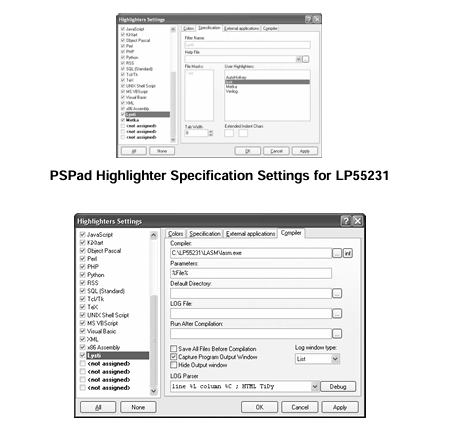
2. Select Specification tab. See PSPad Highlighter Specification Settings for LP55231.
3. On the left (highlighter) list, click on one of bolded highlighters (marked with -tab).
4. On the right side is list of user highlighters, select the Lysti highlighter and click on it (see PSPad Highlighter Specification Settings for LP55231). Click on ‘Apply’ to confirm this action.
Also set the compiler search path and parameters for the LASM.exe, as shown in PSPad compiler settings for LP55231. Note: These variable names are all case-sensitive so, for example %File% will work, but %file% and %FILE% will fail to produce the expected results. . You may need to replace the shown filepath C:\LP55231\LASM\LASM.exe with your actual path. Tag the Capture Program Output Window as shown in PSPad compiler settings for LP55231. Note: These variable names are all case-sensitive so, for example %File% will work, but %file% and %FILE% will fail to produce the expected results. . Accept highlighter settings by clicking ‘OK’. Finally, in the main window show the LOG window by pressing CTRL + L. All software needed should be now ready for writing and assembling the first program. Note: The maximum length of a source code line is 140 characters. Lines that are longer than 140 are not assembled correctly.
HARDWARE SET-UP
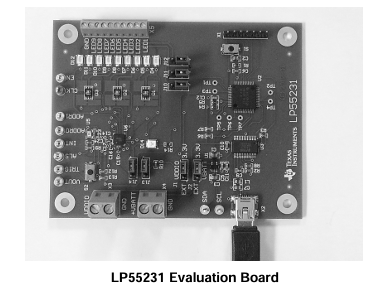
The LP55231 evaluation board has USB communication and evaluation-related components assembled onto one board. (See LP55231 Evaluation Board.) The evaluation board was designed specially for evaluation and therefore is not optimized for the smallest layout size. The components are physically large to make changing of the value easy if needed. The LP55231 input voltage VDD is supplied from the USB port or from an external voltage applied to the X4 connector.
- TLA2024EVM-PDK_TI(德州仪器)中文资料_英文资料_价格_PDF手册
- INA229_239EVM_TI(德州仪器)中文资料_英文资料_价格_PDF手册
- DAC8832EVM-PDK _TI(德州仪器)中文资料_英文资料_价格_PDF手册
- LP8557IEVM_TI(德州仪器)中文资料_英文资料_价格_PDF手册
- LAUNCHXL-F28027F TI(德州仪器)中文资料_英文资料_价格_PDF手册
- DLPDLCR160CPEVM DLP160CP TI(德州仪器)中文资料_英文资料_价格_PDF手册
- THS4631DDAEVM TI(德州仪器)中文资料_英文资料_价格_PDF手册
- DAC3482EVM TI(德州仪器)中文资料_英文资料_价格_PDF手册
- THS4302EVM TI(德州仪器)中文资料_英文资料_价格_PDF手册
- ADS7038Q1EVM-PDK_TI(德州仪器)中文资料_英文资料_价格_PDF手册
- LM3450AEV230V30/NOPB_TI(德州仪器)中文资料_英文资料_价格_PDF手册
- TPS72728DSEEVM-406_TI(德州仪器)中文资料_英文资料_价格_PDF手册
- WL1835MODCOM8A_TI(德州仪器)中文资料_英文资料_价格_PDF手册
- TAS5424BQ1DKDEVM_TI(德州仪器)中文资料_英文资料_价格_PDF手册
- ADS7042EVM-PDK_TI(德州仪器)中文资料_英文资料_价格_PDF手册
 工商网监
工商网监