
TAS5424BQ1DKDEVM
The TAS5414B/TAS5424B evaluation module (EVM) is intended to be used to demonstrate the capabilities of the device. All the device features can be accessed through the hardware and the software graphical user interface (GUI) supplied. This user’s guide contains a description of the EVM and the GUI. Included are the EVM schematics, bill of materials, and the board layout.
1 Quick-Start Guide
This section provides a guide to set up and power up the EVM without the details of its operation. For a more-detailed description, read the complete user's guide.
1.1 Overview
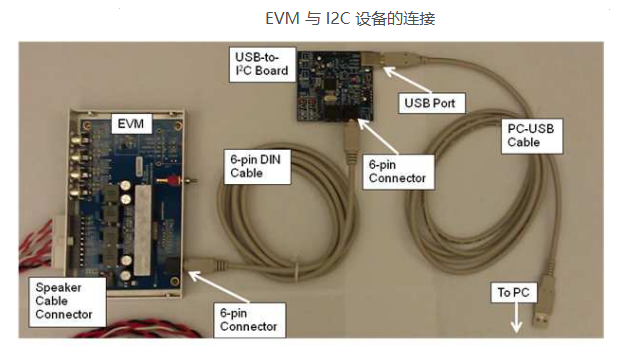
The EVM consists of a single printed circuit board (PCB) mounted inside a metal chassis for EMC testing. The EVM must have an external I 2C controller board to function. The USB-to-I2C controller board connects to a personal computer (PC) through a USB cable. The EVM connects to the I 2C controller through a supplied 6-pin DIN cable. The PC needs the graphical user interface (GUI) software to control the EVM. See Figure 1 for the device connections.
Software is available on the enclosed CDrom and provides the GUI, this document, and any other necessary documents. Hardware provided in the EVM modules consists of the EVM, an I 2C controller board, a USB cable, a 6-pin DIN cable, and speaker cables
1.2 Software Installation
The software is provided on the TI Web site. Run the setup.exe program to install the GUI. For more details, see Section 1.5, Basic Graphical User Interface Controls.
1.3 Connections
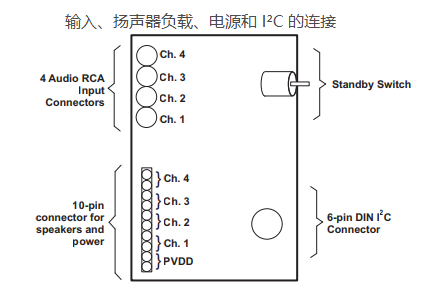
The connections are for an analog signal for the input, speaker loads, power, and I 2C. The audio inputs are made through the four RCA connectors. The power connectors and speaker connectors are made using the 10-pin connector.
using the 10-pin connector. The I 2C connections are made through a 6-pin DIN connector. The provided adapter PCB and cable connect the EVM to the PC. The adapter PCB is an I 2C-to-USB converter, which is a human-interface device (HID) and is automatically recognized by the PC when connected. Therefore, no drivers are needed.
The basic connections are: PVDD or power is connected to the EVM through the supplied 10-pin connector with the twisted red and black wires. The speakers or loads are also connected through the same 10-pin connector with the twisted red and white wires. The 6-pin DIN is connected to the I 2C-to-USB adapter board. See Figure 2 for EVM input details.
1.4 Initial Power Up
Before applying power, check to make sure the standby control switch is in the Standby OFF position, as shown in Figure 3. If the switch is in the Standby ON position, then at power up the I 2C LED indicator on the GUI is red (see Section 3.4.3 for more details).
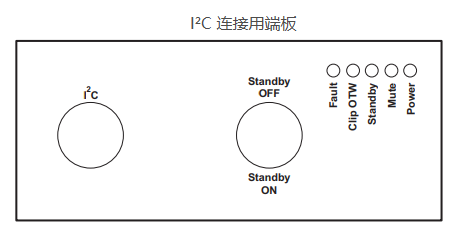
Apply power: the Standby, Mute, and Power LEDs should be on. The Fault LED may also be on, but not necessarily. This indicates that the unit is powered, and the TAS5414B or TAS5424B is in Standby Mode and Mute Mode. The fault indicated is an undervoltage fault during power up. This is normal and is cleared by reading I 2C Register 0x00 (the Read Faults button) twice. Reading the faults once clears the faults, and the second read is to ensure that all the faults have been cleared.
- LP8557IEVM_TI(德州仪器)中文资料_英文资料_价格_PDF手册
- LAUNCHXL-F28027F TI(德州仪器)中文资料_英文资料_价格_PDF手册
- DLPDLCR160CPEVM DLP160CP TI(德州仪器)中文资料_英文资料_价格_PDF手册
- THS4631DDAEVM TI(德州仪器)中文资料_英文资料_价格_PDF手册
- DAC3482EVM TI(德州仪器)中文资料_英文资料_价格_PDF手册
- THS4302EVM TI(德州仪器)中文资料_英文资料_价格_PDF手册
- ADS7038Q1EVM-PDK_TI(德州仪器)中文资料_英文资料_价格_PDF手册
- LM3450AEV230V30/NOPB_TI(德州仪器)中文资料_英文资料_价格_PDF手册
- TPS72728DSEEVM-406_TI(德州仪器)中文资料_英文资料_价格_PDF手册
- WL1835MODCOM8A_TI(德州仪器)中文资料_英文资料_价格_PDF手册
- TAS5424BQ1DKDEVM_TI(德州仪器)中文资料_英文资料_价格_PDF手册
- ADS7042EVM-PDK_TI(德州仪器)中文资料_英文资料_价格_PDF手册
- TMDS570LS31HDK_TI(德州仪器)中文资料_英文资料_价格_PDF手册
- VCA8500BOARD_TI(德州仪器)中文资料_英文资料_价格_PDF手册
- DEM-SOT223LDO_TI(德州仪器)中文资料_英文资料_价格_PDF手册
 工商网监
工商网监